How do I keep my place in a knitting pattern?
In Row & Round, a highlighter bar sits on the row you’re working in your PDF pattern. The page window shows about 6 lines around that row, spaced out, and each tap on +1 moves the bar to the next row, so you find your place again at a glance.
Free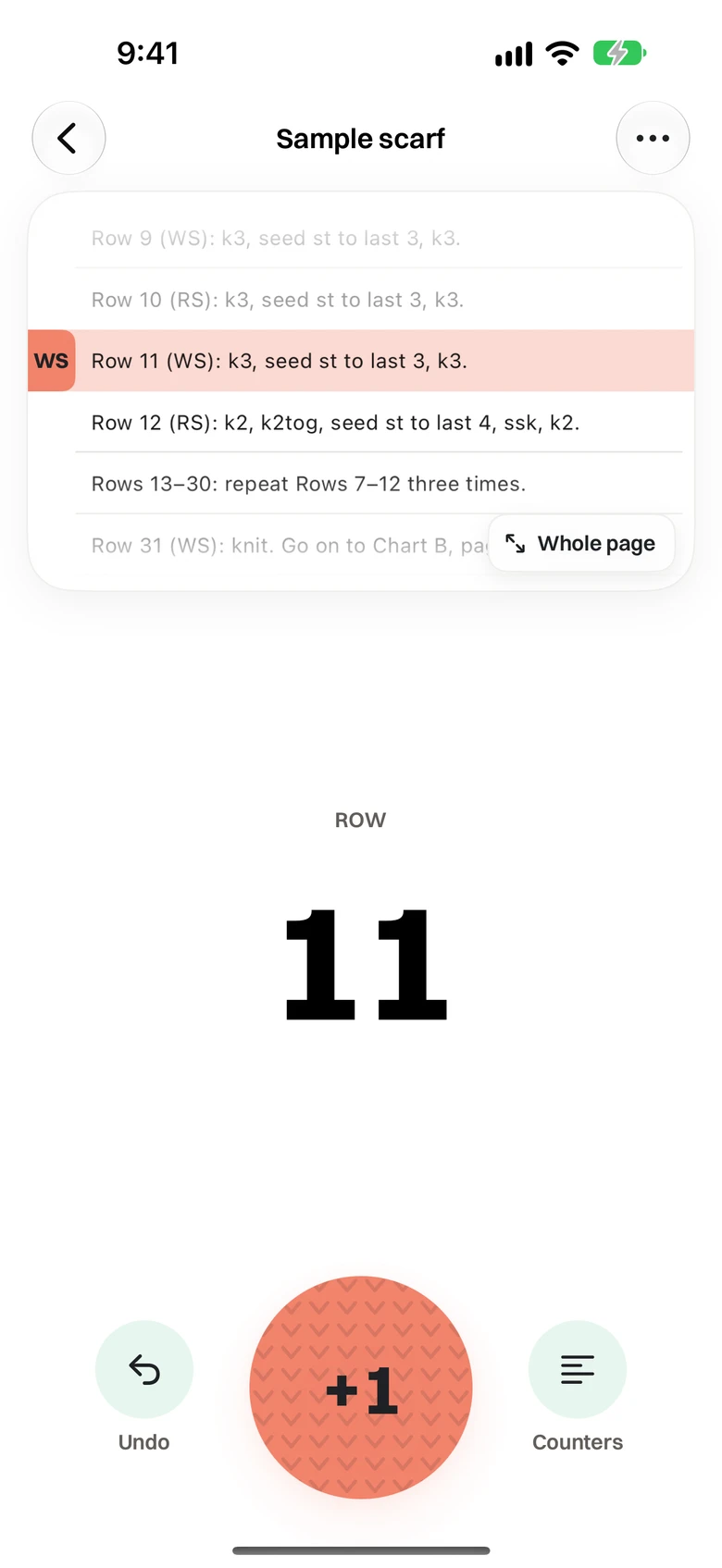
How it works
Row & Round finds the text lines on each page of your pattern and shows a card with the few lines around your row, spaced apart with hairlines and cropped to the column you’re reading. The bar sits on your row and says right side or wrong side. When you reach the last row on a page, the next tap carries the bar to the first row of the next page, following two-column layouts from the bottom of one column to the top of the next. Charts, photos and pages without lines open as the plain page with the bar across one row. Whole page shows the full PDF when you need everything, and Night page gives text pages a dark page with light ink for evening knitting.
When people use it
- Looking up from the needles and finding the row you were on
- Working a lace or colourwork chart one row at a time
- Picking a project up after a week and starting exactly where you stopped
Questions
- Can I move the bar myself?
- Yes. Drag it to the right row or nudge it up and down. Its place is saved for each page.
- Can I change the bar’s colour?
- Yes. The bar comes in Coral, Butter, Mint or Sky.
- Does it change my PDF?
- No. Row & Round copies the PDF into the app and never writes into it. The bar and any markup sit on top.